
Your smart home, on your wrist.
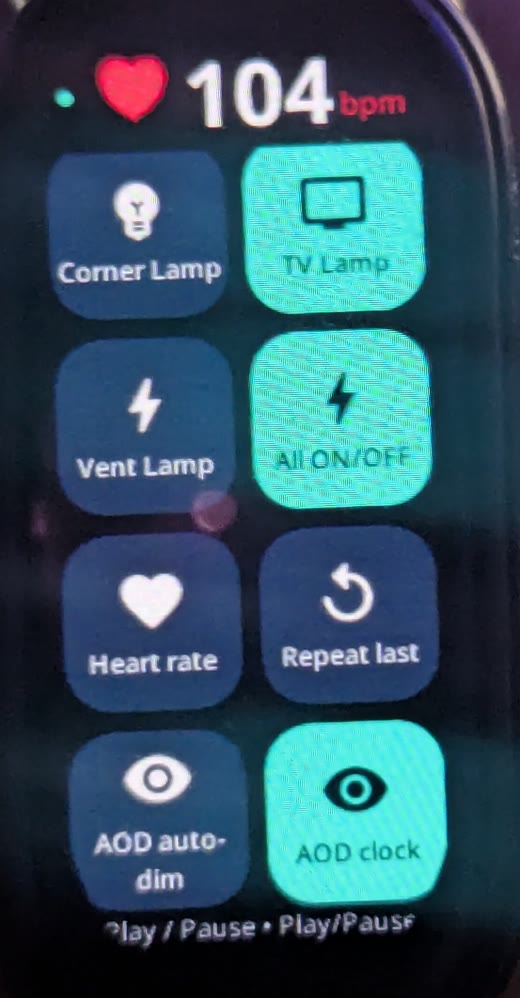
Tap a tile on your Band 9 to switch a lamp, skip back five seconds in the video on your PC, or run anything you have set up in TapRelay. Hold a tile for its own controls. Your live heart rate sits right on top.
Built to feel instant.
The band only draws. Every tap runs on your phone through the same TapRelay engine as your NFC stickers and controller buttons.
Toggles light up the moment you touch them. Volume and skip presses repeat as fast as you tap.
Lamps show brightness, warm and cool white and colours. PC tiles show fullscreen, captions, Game Bar, lock and more.
Grid, compact or list. Small, large or extra large. Eight accent colours. 259 icons, picked from each item's name, never two alike.
Straight from the band's own sensor, with a clock above it, so a glance tells you everything.
Set it up in five minutes
Download TapRelay v0.6.19 on your Android phone, allow the install, open it and add what you want to control: your Govee or Smart Life lights, Sensibo, phone actions or your PC.
Install Notify for Xiaomi from Google Play and pair your Smart Band 9 in it. TapRelay talks to the band through Notify.
On the same phone, download TapRelay-Band9.rpk. It is signed with the same key as TapRelay, which is what lets the two find each other.
In Notify, open Update firmware, choose Third-party app and pick TapRelay-Band9.rpk from Downloads. Keep the band close until it finishes.
Find it in the band's app list and allow the heart-rate prompt. Your tiles appear within a few seconds. A quiet "Band link" notification on the phone keeps it connected while TapRelay is closed.
In TapRelay, open AOD and tap the watch icon. Pick and order your tiles, change any icon, and set the layout, size and colour. The band updates within a second.
Band says "Waiting for phone"? Open TapRelay on the phone once and check that Notify shows your band as connected.
Using Mi Fitness or another companion app? The band link runs through Notify for Xiaomi, so pair the band there.
PC tiles? Back and Forward 5 seconds, fullscreen and the other PC controls need the TapRelay Windows helper paired with your phone.
Downloads
Band app 1.13.7
For Xiaomi Smart Band 9. 1.6 MiB.
Download .rpkSHA-256 b3f653473db3cfbac94dabba7663d42942472bbcd497d2d17650da4679ee77ae
TapRelay 0.6.19 for Android
Android 11 or later. 8.6 MiB.
Download APKSHA-256 f82c60589bd404260632210eb350de11f3e998f9fa2ddea999a8803e446ab7e5
Alpha software, provided as is. TapRelay is not affiliated with, sponsored by, or endorsed by Xiaomi, the developers of Notify for Xiaomi, Govee, Tuya, Sensibo or Google. More about TapRelay.